

If you’re exploring the latest innovations in large language models, Kimi K2 Instruct on HuggingFace is a name you need to know. This cutting-edge model combines massive scale with refined agentic capabilities, offering developers, researchers, and AI enthusiasts a powerful tool for building chatbots, coding assistants, and autonomous systems. Let’s take a closer look at what makes Kimi K2 Instruct stand out.
Kimi K2 is a cutting-edge mixture-of-experts (MoE) language model featuring 32 billion active parameters within a total of 1 trillion parameters developed by MoonshotAI team. Thanks to training with the Muon optimizer, Kimi K2 delivers outstanding results across tasks like advanced reasoning, coding, and complex knowledge challenges, all while being carefully engineered for agent-like behavior and decision-making.
Key Highlights
- Massive Scale Training: Built on a 1-trillion-parameter MoE architecture and trained on 15.5 trillion tokens, Kimi K2 maintained complete training stability throughout.
- MuonClip Optimizer: Leveraging the Muon optimizer at an unprecedented scale, the team developed new optimization techniques to effectively address the challenges of large-scale model training.
- Agentic Intelligence: Purpose-built for tasks involving tool use, step-by-step reasoning, and autonomous problem-solving.
Model Versions
- Kimi-K2-Base: The core model, ideal for researchers and developers seeking a customizable foundation for fine-tuning and tailored applications.
- Kimi-K2-Instruct: A post-trained, ready-to-use version designed for general-purpose chat and agent-based tasks, delivering rapid, reflex-like responses without requiring extended reasoning time.
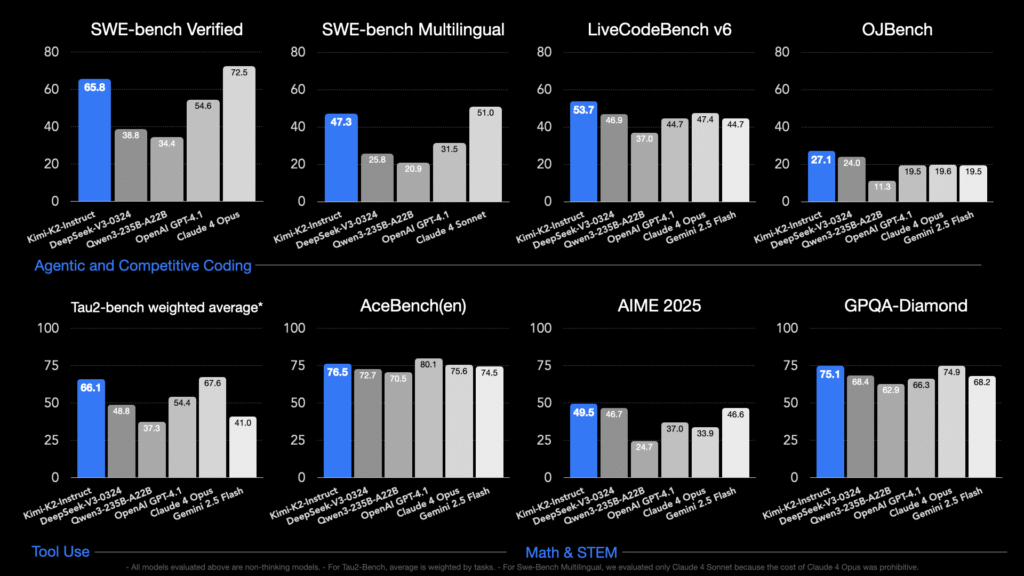
Kimi K2 Model Summary
| Architecture | Mixture-of-Experts (MoE) |
| Total Parameters | 1T |
| Activated Parameters | 32B |
| Number of Layers (Dense layer included) | 61 |
| Number of Dense Layers | 1 |
| Attention Hidden Dimension | 7168 |
| MoE Hidden Dimension (per Expert) | 2048 |
| Number of Attention Heads | 64 |
| Number of Experts | 384 |
| Selected Experts per Token | 8 |
| Number of Shared Experts | 1 |
| Vocabulary Size | 160K |
| Context Length | 128K |
| Attention Mechanism | MLA |
| Activation Function | SwiGLU |
Deployment
Kimi K2 model checkpoints are stored in the block-fp8 format, you can find it on Huggingface.
Currently, Kimi-K2 is recommended to run on the following inference engines:
- vLLM
- SGLang
- KTransformers
- TensorRT-LLM
Deployment examples for vLLM and SGLang can be found in the Model Deployment Guide below.
Kimi K2 Model Deployment Guid
This guide only provides some examples of deployment commands for Kimi-K2, which may not be the optimal configuration. Since inference engines are still being updated frequenty, please continue to follow the guidance from their homepage if you want to achieve better inference performance.
vLLM Deployment
The smallest deployment unit for Kimi-K2 FP8 weights with 128k seqlen on mainstream H200 or H20 platform is a cluster with 16 GPUs with either Tensor Parallel (TP) or “data parallel + expert parallel” (DP+EP).
Running parameters for this environment are provided below. You may scale up to more nodes and increase expert-parallelism to enlarge the inference batch size and overall throughput.
Tensor Parallelism
When the parallelism degree ≤ 16, you can run inference with pure Tensor Parallelism. A sample launch command is:
# start ray on node 0 and node 1

# node 0:
vllm serve $MODEL_PATH \
  --port 8000 \
  --served-model-name kimi-k2 \
  --trust-remote-code \
  --tensor-parallel-size 16 \
  --enable-auto-tool-choice \
  --tool-call-parser kimi_k2
Key parameter notes:
--tensor-parallel-size 16: If using more than 16 GPUs, combine with pipeline-parallelism.--enable-auto-tool-choice: Required when enabling tool usage.--tool-call-parser kimi_k2: Required when enabling tool usage.
Data Parallelism + Expert Parallelism
You can install libraries like DeepEP and DeepGEMM as needed. Then run the command (example on H200):
# node 0
vllm serve $MODEL_PATH --port 8000 --served-model-name kimi-k2 --trust-remote-code --data-parallel-size 16 --data-parallel-size-local 8 --data-parallel-address $MASTER_IP --data-parallel-rpc-port $PORT --enable-expert-parallel --max-num-batched-tokens 8192 --max-num-seqs 256 --gpu-memory-utilization 0.85 --enable-auto-tool-choice --tool-call-parser kimi_k2

# node 1
vllm serve $MODEL_PATH --headless --data-parallel-start-rank 8 --port 8000 --served-model-name kimi-k2 --trust-remote-code --data-parallel-size 16 --data-parallel-size-local 8 --data-parallel-address $MASTER_IP --data-parallel-rpc-port $PORT --enable-expert-parallel --max-num-batched-tokens 8192 --max-num-seqs 256 --gpu-memory-utilization 0.85 --enable-auto-tool-choice --tool-call-parser kimi_k2
SGLang Deployment
Similarly, we can use TP or DP+EP in SGLang for Deployment, here are the examples.
Tensor Parallelism
Here is the simple example code to run TP16 with two nodes on H200:
# Node 0
python -m sglang.launch_server --model-path $MODEL_PATH --tp 16 --dist-init-addr $MASTER_IP:50000 --nnodes 2 --node-rank 0 --trust-remote-code --tool-call-parser kimi_k2

# Node 1
python -m sglang.launch_server --model-path $MODEL_PATH --tp 16 --dist-init-addr $MASTER_IP:50000 --nnodes 2 --node-rank 1 --trust-remote-code --tool-call-parser kimi_k2
Key parameter notes:
--tool-call-parser kimi_k2: Required when enabling tool usage.
Data Parallelism + Expert Parallelism
Here is an example for large scale Prefill-Decode Disaggregation (4P12D H200) with DP+EP in SGLang:
# for prefill node
MC_TE_METRIC=true SGLANG_DISAGGREGATION_HEARTBEAT_INTERVAL=10000000 SGLANG_DISAGGREGATION_BOOTSTRAP_TIMEOUT=100000 SGLANG_DISAGGREGATION_WAITING_TIMEOUT=100000 PYTHONUNBUFFERED=1 \
python -m sglang.launch_server --model-path $MODEL_PATH \
--trust-remote-code --disaggregation-mode prefill --dist-init-addr $PREFILL_NODE0$:5757 --tp-size 32 --dp-size 32 --enable-dp-attention --host $LOCAL_IP --decode-log-interval 1 --disable-radix-cache --enable-deepep-moe --moe-dense-tp-size 1 --enable-dp-lm-head --disable-shared-experts-fusion --watchdog-timeout 1000000 --enable-two-batch-overlap --disaggregation-ib-device $IB_DEVICE --chunked-prefill-size 131072 --mem-fraction-static 0.85 --deepep-mode normal --ep-dispatch-algorithm dynamic --eplb-algorithm deepseek --max-running-requests 1024 --nnodes 4 --node-rank $RANK --tool-call-parser kimi_k2


# for decode node
SGLANG_DEEPEP_NUM_MAX_DISPATCH_TOKENS_PER_RANK=480 MC_TE_METRIC=true SGLANG_DISAGGREGATION_HEARTBEAT_INTERVAL=10000000 SGLANG_DISAGGREGATION_BOOTSTRAP_TIMEOUT=100000 SGLANG_DISAGGREGATION_WAITING_TIMEOUT=100000 PYTHONUNBUFFERED=1 \
python -m sglang.launch_server --model-path $MODEL_PATH --trust-remote-code --disaggregation-mode decode --dist-init-addr $DECODE_NODE0:5757 --tp-size 96 --dp-size 96 --enable-dp-attention --host $LOCAL_IP --decode-log-interval 1 --context-length 2176 --disable-radix-cache --enable-deepep-moe --moe-dense-tp-size 1 --enable-dp-lm-head --disable-shared-experts-fusion --watchdog-timeout 1000000 --enable-two-batch-overlap --disaggregation-ib-device $IB_DEVICE  --deepep-mode low_latency --mem-fraction-static 0.8 --cuda-graph-bs 480 --max-running-requests 46080 --ep-num-redundant-experts 96 --nnodes 12 --node-rank $RANK --tool-call-parser kimi_k2

# pdlb
PYTHONUNBUFFERED=1 python -m sglang.srt.disaggregation.launch_lb --prefill http://${PREFILL_NODE0}:30000 --decode http://${DECODE_NODE0}:30000
KTransformers Deployment
Please copy all configuration files (i.e., everything except the .safetensors files) into the GGUF checkpoint folder at /path/to/K2. Then run:
python ktransformers/server/main.py --model_path /path/to/K2 --gguf_path /path/to/K2 --cache_lens 30000
To enable AMX optimization, run:
python ktransformers/server/main.py --model_path /path/to/K2 --gguf_path /path/to/K2 --cache_lens 30000 --optimize_config_path ktransformers/optimize/optimize_rules/DeepSeek-V3-Chat-fp8-linear-ggml-experts-serve-amx.yaml
TensoRT-LLM Deployment
Prerequisite
Please refer to this guide to build TensorRT-LLM v1.0.0-rc2 from source and start a TRT-LLM docker container.
install blobfile by:
pip install blobfile
Multi-node Serving
TensorRT-LLM supports multi-node inference. You can use mpirun to launch Kimi-K2 with multi-node jobs. We will use two nodes for this example.
mpirun
mpirun requires each node to have passwordless ssh access to the other node. We need to setup the environment inside the docker container. Run the container with host network and mount the current directory as well as model directory to the container.
# use host network
IMAGE=<YOUR_IMAGE>
NAME=test_2node_docker
# host1
docker run -it --name ${NAME}_host1 --ipc=host --gpus=all --network host --privileged --ulimit memlock=-1 --ulimit stack=67108864 -v ${PWD}:/workspace -v <YOUR_MODEL_DIR>:/models/DeepSeek-V3 -w /workspace ${IMAGE}
# host2
docker run -it --name ${NAME}_host2 --ipc=host --gpus=all --network host --privileged --ulimit memlock=-1 --ulimit stack=67108864 -v ${PWD}:/workspace -v <YOUR_MODEL_DIR>:/models/DeepSeek-V3 -w /workspace ${IMAGE}
Set up ssh inside the container
apt-get update && apt-get install -y openssh-server

# modify /etc/ssh/sshd_config
PermitRootLogin yes
PubkeyAuthentication yes
# modify /etc/ssh/sshd_config, change default port 22 to another unused port
port 2233

# modify /etc/ssh
Generate ssh key on host1 and copy to host2, vice versa.
# on host1
ssh-keygen -t ed25519 -f ~/.ssh/id_ed25519
ssh-copy-id -i ~/.ssh/id_ed25519.pub root@<HOST2>
# on host2
ssh-keygen -t ed25519 -f ~/.ssh/id_ed25519
ssh-copy-id -i ~/.ssh/id_ed25519.pub root@<HOST1>

# restart ssh service on host1 and host2
service ssh restart # or
/etc/init.d/ssh restart # or
systemctl restart ssh
Generate additional config for trtllm serve.
cat >/path/to/TensorRT-LLM/extra-llm-api-config.yml <<EOF
cuda_graph_config:
  padding_enabled: true
  batch_sizes:
    - 1
    - 2
    - 4
    - 8
    - 16
    - 32
    - 64
    - 128
print_iter_log: true
enable_attention_dp: true
EOF
After the preparations,you can run the trtllm-serve on two nodes using mpirun:
mpirun -np 16 \
-H <HOST1>:8,<HOST2>:8 \
-mca plm_rsh_args "-p 2233" \
--allow-run-as-root \
trtllm-llmapi-launch trtllm-serve serve \
--backend pytorch \
--tp_size 16 \
--ep_size 8 \
--kv_cache_free_gpu_memory_fraction 0.95 \
--trust_remote_code \
--max_batch_size 128 \
--max_num_tokens 4096 \
--extra_llm_api_options /path/to/TensorRT-LLM/extra-llm-api-config.yml \
--port 8000 \
<YOUR_MODEL_DIR>
Others
Kimi-K2 reuses the DeepSeekV3CausalLM architecture and convert it’s weight into proper shape to save redevelopment effort. To let inference engines distinguish it from DeepSeek-V3 and apply the best optimizations, we set "model_type": "kimi_k2" in config.json.
If you are using a framework that is not on the recommended list, you can still run the model by manually changing model_type to “deepseek_v3” in config.json as a temporary workaround. You may need to manually parse tool calls in case no tool call parser is available in your framework.